2.1 - App Onboarding
The Mozaic Earth Mobile App is designed to bridge the gap between high-level strategy and ground-truth reality. It provides field teams, regardless of prior ecological experience, the tools to collect data with precision navigation and intuitive task management, ensuring every metric is scientifically robust and actionable.
Before heading into the field, ensure you have access to the app and the project active.
-
Download: Search "Mozaic Earth" in your relevant app store and download.
-
Log-in:
-
Enter your email address into the app.
-
Check your inbox for a 6-digit passcode and enter it to verify.
💡 Pro Tip: If the code doesn't arrive, check your junk or spam folder.
-
-
Identity: Enter your name to create your account identity. This allows project managers to identify who collected specific data points for the audit trail.
-
Access: To view projects, a Project Manager must first add you via the User Management tab on the dashboard. If you do not see your project, please verify your access with your team lead
-
Offline: The app works offline for data collection in remote locations. However, you must log in and load the project while connected to wifi to ensure all maps and tasks are loaded and ready for offline fieldwork.
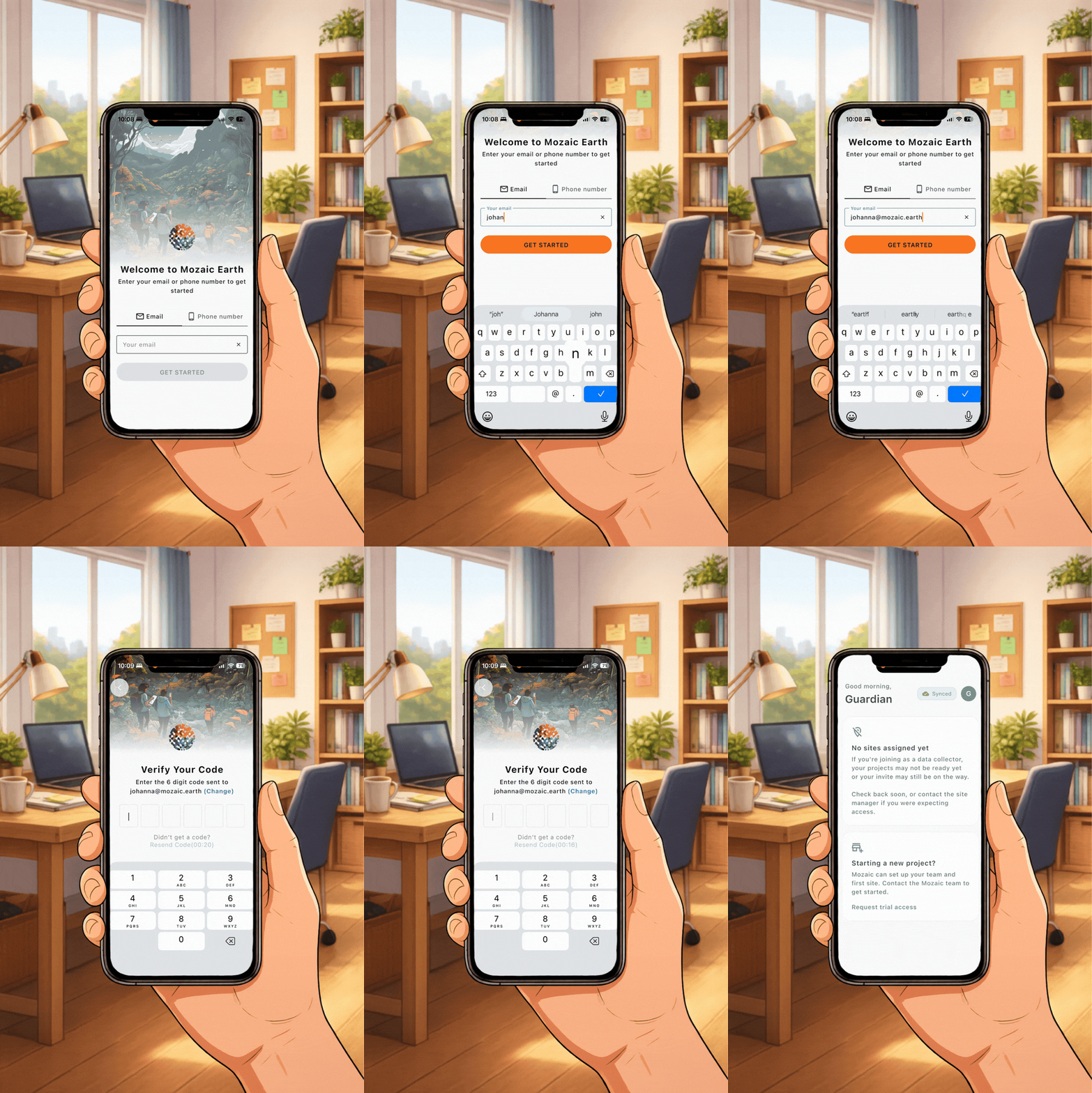
How to log-in to the Mozaic Earth App